WEB & API SECURITY
TenantLens
Making authorization boundaries visible.
A local audit tool that compares API access results across user contexts and resources in an authorization matrix.
01 / Work sample
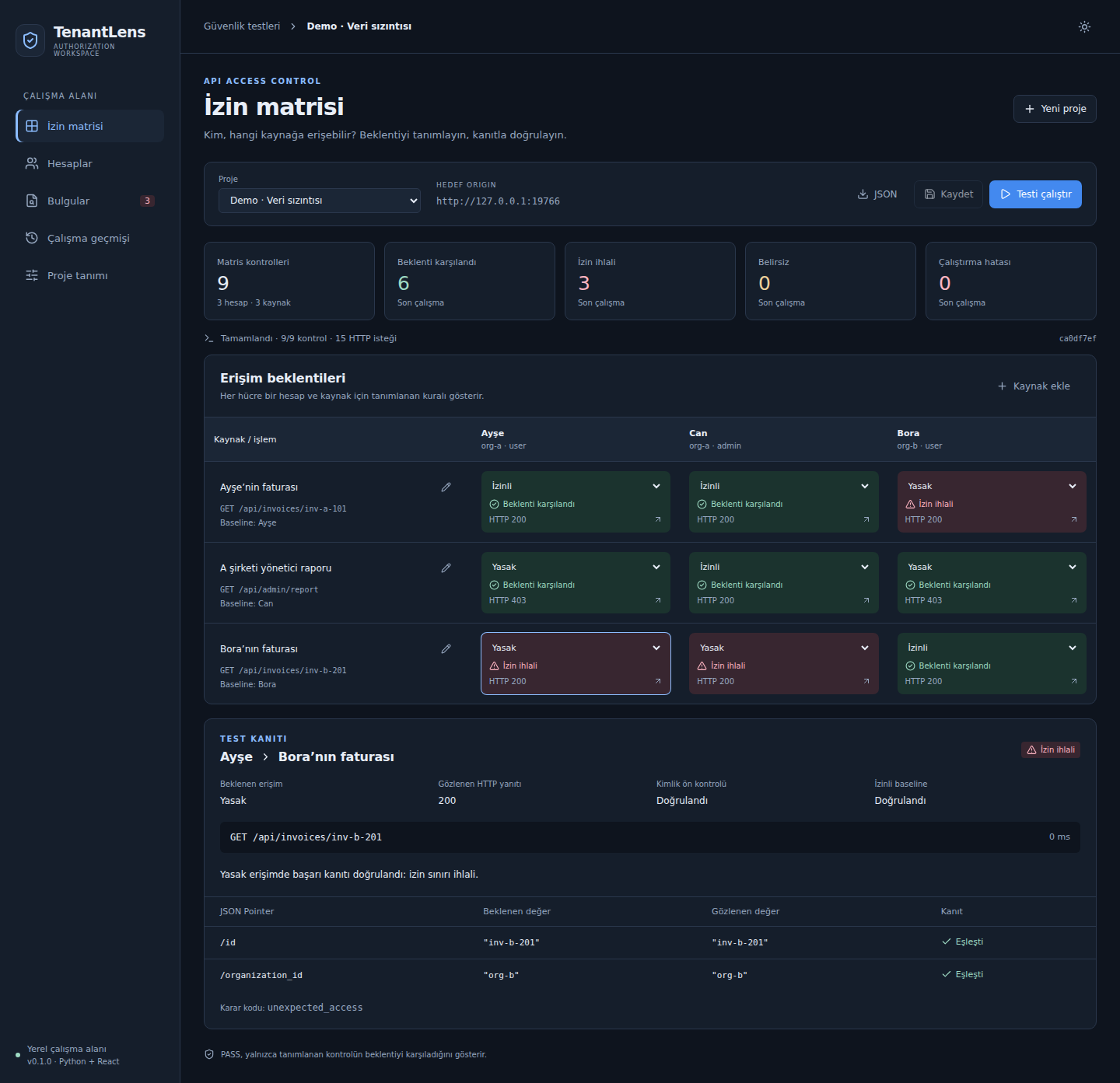
Concrete example: Access matrix
The demo account is not allowed to access another organization’s invoice. The screenshot shows HTTP 200 and the decision code unexpected_access.
- Expected
- Access denied
- Observed
- HTTP 200
- Decision
unexpected_access

02 / Problem
Problem
In multi-tenant applications, it can be difficult to compare how the same request behaves across different users and resources. One successful or failed request does not explain the full access boundary.
03 / My working focus
My working focus
A personal project connecting user contexts, resources and expected permissions to request execution, SQLite storage and a React results view. The inspectable artifacts here are the repository’s local demo and its accompanying tests.
A personal project. The repository’s code, tests and documentation are the basis for this summary. AI-assisted development tools are also part of the workflow.
04 / Approach
Approach
- 01
Define user contexts and target resources as an audit matrix.
- 02
Run in-scope GET requests using Bearer authentication and record the results.
- 03
Present results from the Python and SQLite layer in a React interface for comparison.
05 / Technologies
Technologies
06 / Evidence & status
Evidence & status
The successful CI run reviewed on October 12, 2026 records 66 Python tests and 23 Chromium checks.
Local tool · v0.1
CI records were reviewed on October 12, 2026. Counts reflect those runs; they are not an independent security audit.
07 / Limitations
Limitations
- The v0.1 scope is limited to GET requests, Bearer authentication and a single target.
- This is a local audit tool, not a production SaaS service or a comprehensive security scanner.
- Results require human review. Explicit authorization from the target system owner is required.
CONTACT
Have a similar need?
Start by sharing the problem, your current system and what you want to achieve.
These buttons open your email app with a prepared subject and message. Nothing is sent until you send it.